
WIP : Elegant Seahorse Part I


As promise to myself, I have decided to begin publishing my Work-in-progress pieces on my blog . I hope that by doing this, I can push my self to continue developing my portfolio outside of work and to also get some useful critique and pointers from others.

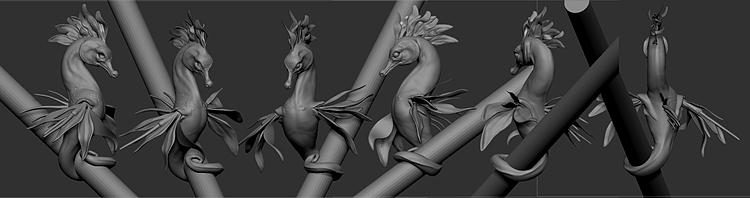
I spent about 7 hours this week, upgrading my elegant seahorse concept. Before I began working on it, the creature looked like this :


After 7 hours, I was able to base-block the scales on the upper body and play with mid-range details.
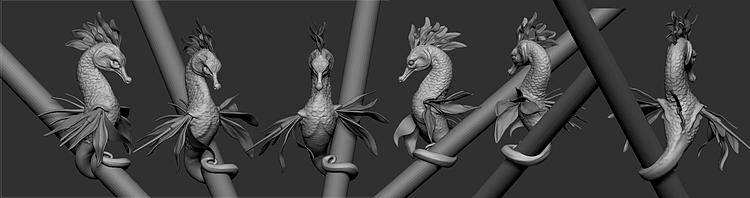
After a lot of messing around, I decided that hand-sculpting in the scales would be the best route for this project. Since the seahorse is already posed and asymmetrical, I felt as if hand sculpting vs, using alphas wouldn't be that much of a difference, since I could't lay out alphas on the symmetry line and since the scales needed to flow with the form.


My hope is that by next week, I will have most of the mid level details done on the seahorse body so that I can begin to refine and shape the fins. Now that I have a method, refining the scales is going by rather quickly.

After finishing them, I might have to add back in some of the muscle masses underneath.. The neck feels like it is flattening out.


WIP Elegant Seahorse Part 02 >>

Comments

Popular posts from this blog

Scales Generator Parameter Breakdown

I Recently finished my scales generator. This is a fairly flexible generator that allows you to do quite a lot of things. The generator is availalbe on substance share here : Scale Generator . Check out the parameter list below.

Making a Seamless Scale Material Part I

Today, I wanted to share my process for creating a seamless, scale-able material that can either be projected onto Zbrush models or applied as materials to UV'd models inside of programs like Maya and 3Ds Max. I used this when creating my unique stylized scale surfaces. You can find breakdowns for them here : Stylized Scale Materials This is a tutorial that will be split into four parts. Below is an outline on what we will cover.  This post will be addressing part 1.            Part 1:  Approaching Scales and Creating a Pattern.           Part 2:  Refining your pattern in Zbrush.           Part 3: Creating a compelling and believable scale Material inside of Maya I will be using the following programs to create my Scale material : Adobe Photoshop (optional) , Adobe Illustrator (optional), Zbrush , Vray and Maya.  Part 1: Approaching and Creating A Pattern ...

Loosing Access to Shading Groups ( Mental-ray )

When Using Mental-ray, your materials could disappear from your imported assets. Thankfully, just deleting namespaces can fix this issue This addresses an issue that I started noticing in Maya when using Mental ray . I noticed that when importing geo files with materials assigned to them ( .fbx or . ma) I was loosing access to my shading groups through the attribute editor. which meant I couldn't directly select my material in the Attribute Editor after grabbing my object in the Viewport. I knew the materials were still assigned. When I rendered the scene , the information was still there. When I went to the hypershade, I was was able to right-click on a material and choose " Select Objects with Material" and the objects with the Material would light up in my view-port. The material was still attached so why could't I edit it in my attribute editor?! It turns out that there is a very simple solution to this. While I can't give a definitive explanati...